
Managing Approval Requests
Overview
Approval Request Management provides a centralized governance experience for reviewing and processing workflow driven requests across Fixiam.
Approval workflows help organizations enforce operational control and accountability for sensitive activities performed across the platform.
Depending on organizational configuration, approval workflows may apply to operations such as:
- User creation
- User updates
- Group creation
- Group assignment
- Role assignment
- Application management
- Access changes
- Provisioning activities
- Other governance controlled operations
When a workflow enabled operation is initiated, the request is routed to the configured approvers for review and action.
The approval management experience provides visibility into:
- Pending approvals
- Approval history
- Workflow status
- Approval timelines
- SLA monitoring
- Governance activity
- Approval decisions
This helps organizations improve operational governance, accountability, and approval traceability across the platform.
Approval Requests Dashboard
Approval requests can be accessed from the platform navigation menu. The dashboard provides operational visibility into approval activities across the organization.
Administrators and approvers can monitor:
- Pending requests
- Approved requests
- Rejected requests
- Request statuses
- Workflow activity
- Approval timelines
Dashboard Summary Cards
The summary section provides high-level visibility into approval operations.
Available metrics include:
| Metric | Description |
|---|---|
| Pending Requests | Requests awaiting approval action |
| Total Approved | Successfully approved requests |
| Total Rejected | Requests rejected during review |
>
Pending Requests
The Pending Requests tab displays all requests currently awaiting review or approval.
Each request entry includes:
| Field | Description |
|---|---|
| Request ID | Unique workflow request identifier |
| Request Type | Type of request submitted |
| Requested By | User who initiated the request |
| Submission Date | Date and time the request was submitted |
| Status | Current workflow status |
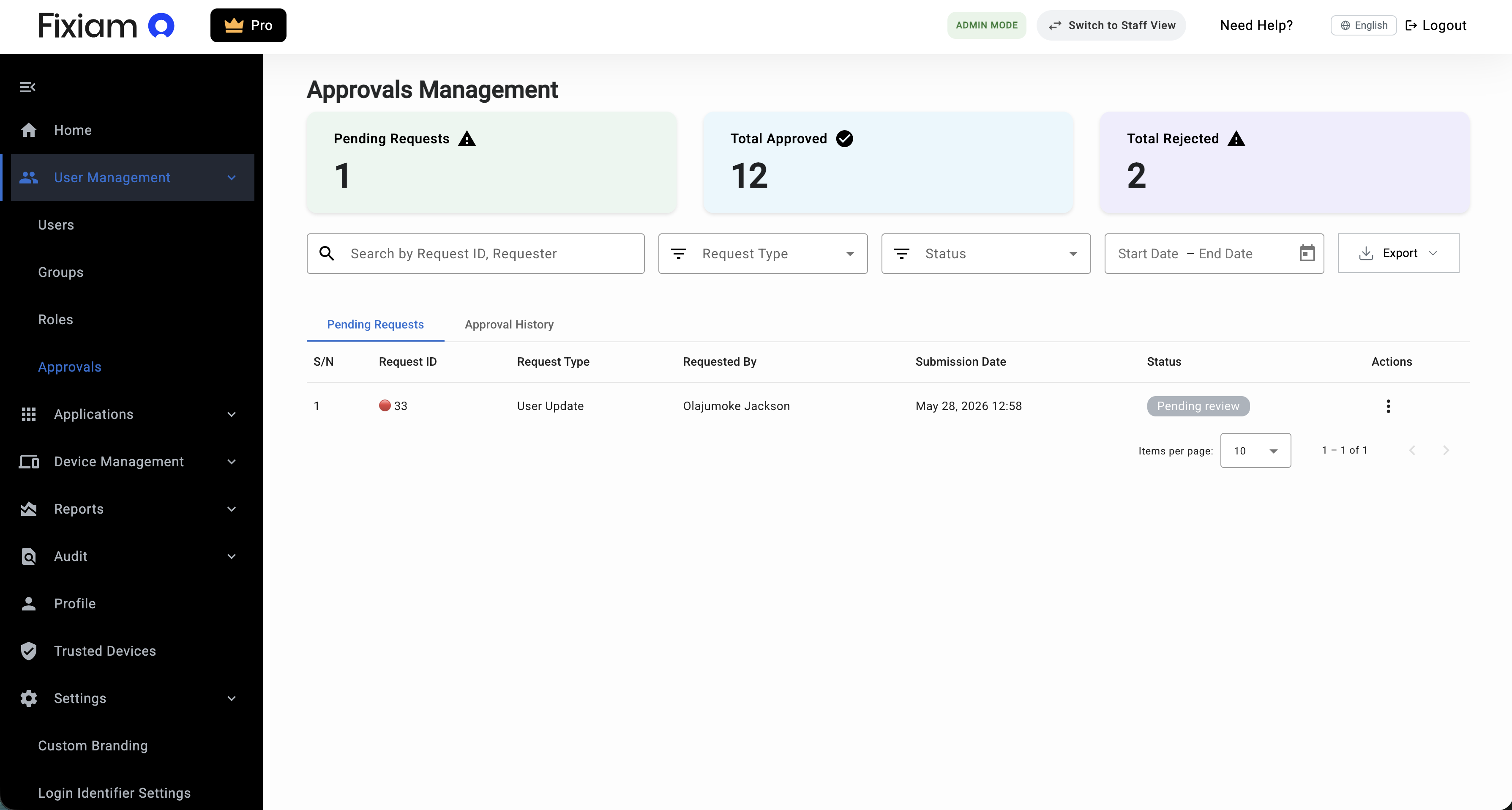
Approval workflows may support different operational request types depending on organizational configuration.
Examples may include:
- User creation requests
- User update requests
- Group operations
- Role assignment requests
- Application related approvals
- Access governance requests
- Provisioning related approvals
The request type displayed within the approval dashboard depends on the workflow associated with the operation.
Approval History
The Approval History tab provides visibility into previously processed requests.
This helps organizations:
- Review historical approval decisions
- Monitor completed approvals
- Track rejected requests
- Support audit and governance reviews
Viewing Request Details
Selecting a request opens the approval details page.
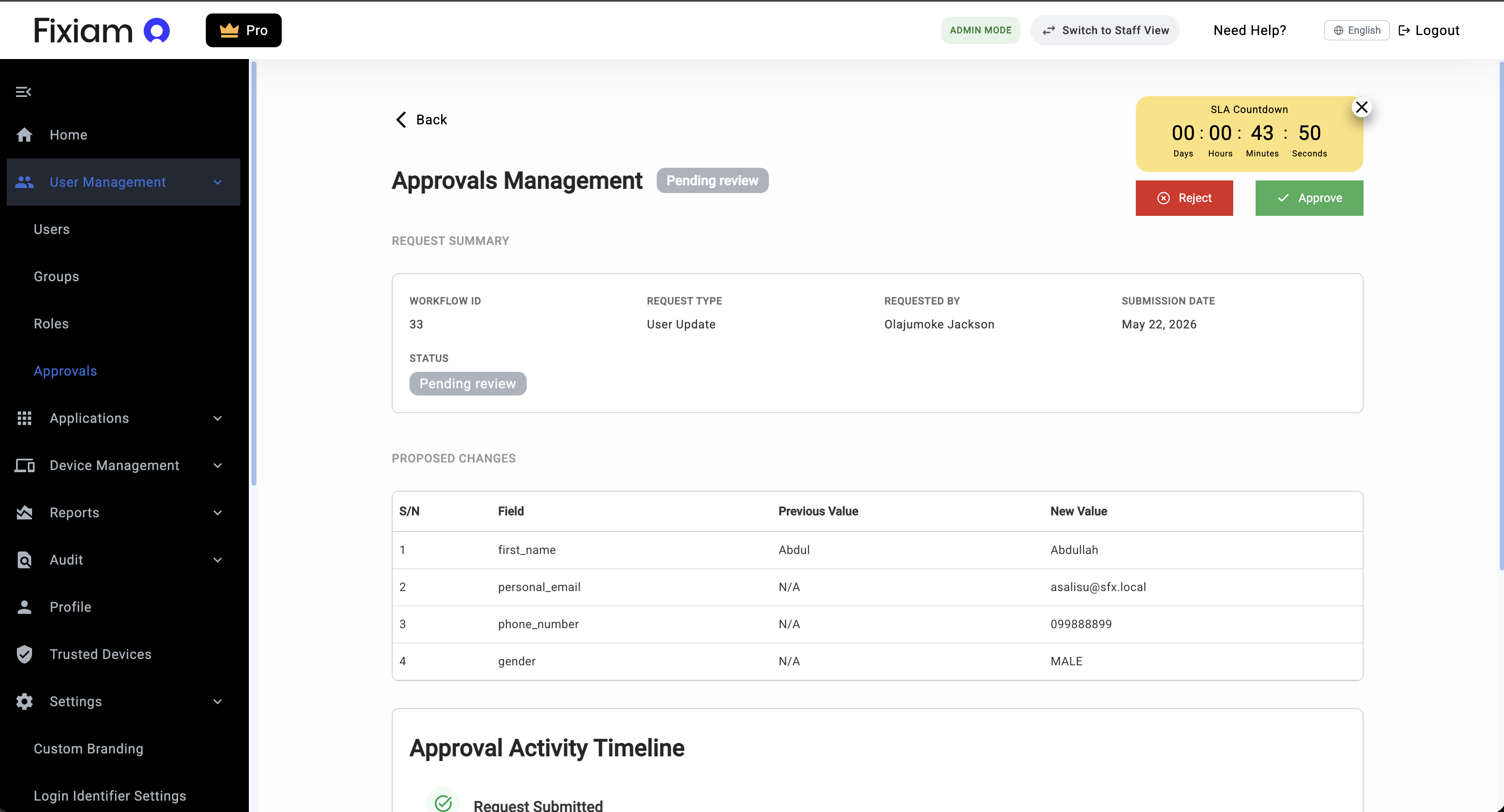
The request details page provides complete operational visibility into the submitted workflow request.
Request Summary
The Request Summary section displays core workflow information.
Available details may include:
| Field | Description |
|---|---|
| Workflow ID | Unique approval workflow identifier |
| Request Type | Type of request submitted |
| Requested By | User who initiated the request |
| Submission Date | Date the request was created |
| Status | Current request state |
Reviewing Submitted Information
The details section displays the actual information associated with the request.
Depending on the request type, this may include:
- User details
- Username
- Email address
- Role assignments
- Group assignments
- Access related information
- Application related information
- Provisioning related information
Approvers should carefully review submitted information before taking approval actions.
Approval Activity Timeline
The Approval Activity Timeline provides a chronological history of workflow events associated with the request.
Timeline entries may include:
- Request submission
- Approval stages
- Approval actions
- Rejection actions
- Approver information
- Approval timestamps
- Approval comments or reasons
>
This helps organizations maintain operational transparency and approval traceability.
Approving Requests
Approvers can approve requests directly from the request details page.
To approve a request:
- Open the approval request
- Review the submitted information
- Review workflow activity where necessary
- Click Approve
>
Once approved:
- The workflow status is updated
- The requested operation is processed
- The approval activity is recorded in the timeline
Rejecting Requests
Approvers can reject requests that do not meet operational or governance requirements.
To reject a request:
- Open the approval request
- Review the request details
- Click Reject
- Provide a rejection reason where applicable
>
Once rejected:
- The request status is updated
- The requested operation is not processed
- The rejection activity is recorded in the approval timeline
SLA Monitoring and Approval Escalation
Approval workflows may include SLA based response timelines to help organizations manage approval responsiveness.
Where configured, approvers may receive reminder notifications when requests remain pending beyond expected review timelines.
The SLA countdown timer provides visibility into the remaining response window for pending approvals.
This helps organizations:
- Reduce approval delays
- Improve operational responsiveness
- Prevent workflow bottlenecks
- Improve governance accountability
Administrative Override
Fixiam supports administrative override capabilities for emergency operational scenarios.
Where necessary, authorized administrators with elevated platform privileges can override approval workflows when the assigned approver is unavailable or unable to complete the review process.
Examples may include:
- Emergency operational requests
- Approver unavailability
- Business continuity scenarios
- Time sensitive operational changes
During an override action:
- The override activity is recorded
- The acting administrator is logged
- The override reason is captured
- Workflow audit visibility is maintained
This helps organizations maintain operational continuity while preserving governance traceability.
>
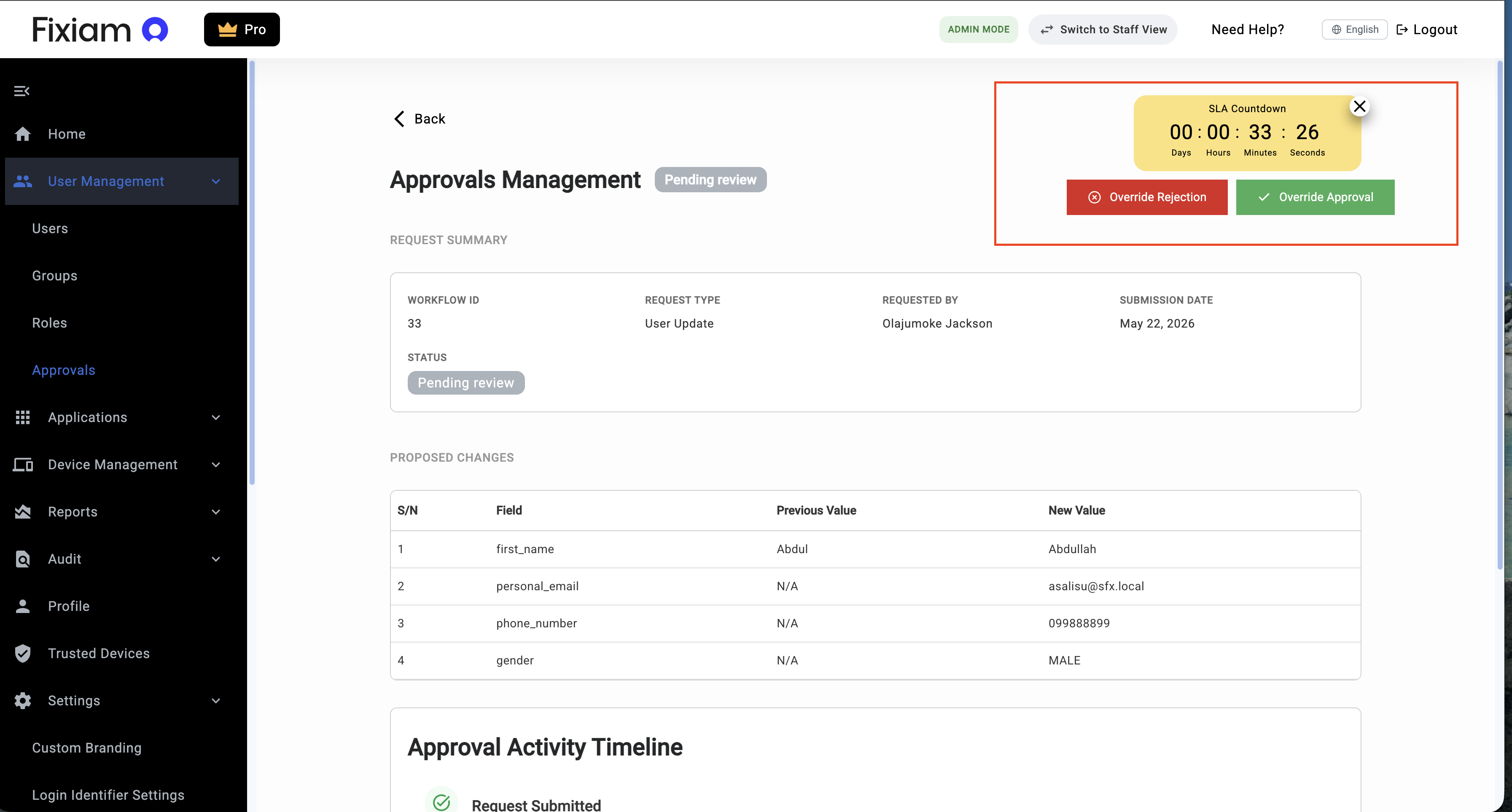
Override Audit Visibility
Administrative overrides are recorded as part of workflow activity history.
Recorded information may include:
| Field | Description |
|---|---|
| Override Performed By | Administrator who performed the override |
| Override Timestamp | Date and time of the override |
| Override Reason | Justification provided during override |
| Original Approver | Assigned workflow approver |
| Workflow Reference | Associated workflow request |
This ensures override actions remain fully auditable.
Request Statuses
Approval requests may move through different workflow states.
| Status | Description |
|---|---|
| Pending Review | Awaiting approver action |
| Approved | Request successfully approved |
| Rejected | Request rejected during review |
Filtering and Searching Requests
Administrators can filter and search approval requests using available filters.
Supported filters may include:
- Request type
- Request status
- Submission date range
- Request ID
- Request initiator
This helps administrators quickly locate specific approval requests.
Exporting Approval Records
Approval records can be exported for operational review and reporting purposes.
Export functionality helps organizations:
- Maintain approval records
- Support governance reviews
- Assist with audit preparation
- Perform operational reporting
Governance and Audit Visibility
Approval activities are recorded to improve operational accountability and governance visibility.
Tracked activities may include:
- Workflow submission
- Approval decisions
- Rejection actions
- Workflow timestamps
- Approver identity
- Approval history
- Administrative overrides
This supports organizational governance and audit readiness.
Best Practices
Review Requests Carefully
Always validate request information before approving access related changes.
Monitor Pending Requests Regularly
Review pending requests frequently to avoid operational delays.
Use Approval History for Reviews
Leverage approval history when reviewing recurring operational requests.
Monitor SLA Timelines
Track pending approvals before SLA expiration to improve workflow responsiveness.
Restrict Override Usage
Administrative overrides should only be used for legitimate emergency or business continuity scenarios.
Troubleshooting
| Issue | Possible Cause | Resolution |
|---|---|---|
| Request not visible | Request not assigned to current approver | Validate workflow assignment |
| Unable to approve request | Missing approval permission | Review administrative privileges |
| Request remains pending | Approval action not completed | Reopen and complete approval |
| Approval timeline missing entries | Workflow activity not refreshed | Reload request details |
| SLA timer expired | Approval not completed within expected timeline | Review workflow escalation process |
| Override option unavailable | User lacks elevated administrative privilege | Review administrator permissions |
Updated about 2 months ago